SEO Checklist for nextjs
Date: 29/11/2025
1. Basics of SEO in Nextjs
1.1. Use SSR or SSG for routes
The first important thing is obviously using server components for pages. never make your page.tsx itself a client component.
but why does it have to be a server component?
- Using client components for page root makes the whole page client rendered. that means your page will be initially empty and javascript fills it with the actual UI after it loads. Search engines only see the empty page and consider it a bad page without any content.
- Having the whole page as client component makes all children also client side rendered (this is bad. read more in section 2.1).
- You can't use metadata in client components (the following section)
1.2. Use Metadata in each page (or layout)
This is the most important thing. You should set a title and a description metadata for each page. These are what people see in search results. what you write in the title, will be shown as the link to your page. the description is also written below it and helps identifying keywords when people search for a specific thing.
Your title should be helpful and straightforward. It's usually the title of the page (e.g. "about me") and sometimes is followed by the website name (e.g. "pouria kheiri") like About Me | Pouria Kheiri.
Example of using metadata in nextjs:
Wait! what about pages with dynamic routes? There is one [slug] route in our code but multiple pages will be generated by it that require a completely different title and description. That's where we use generateMetadata() instead. It dynamically generates title and description for each page.
Example of using generateMetadata() in nextjs:
Now, each dynamic page has its own title and description.
⚠️
Make sure you don't write the same description for multiple pages. It has a bad effect on SEO.
1.3. Generate a sitemap
What's a sitemap?
A sitemap is simply a list of all your pages in XML format that you give to search engines. We create this file and upload it on google search console. It's like handing Google a map of your website saying "Hey, these are all my pages, please index them!".
Is it necessary?
No, but highly recommended. Search engines may occasionally crawl your website but it takes a very very long time. But if you give them a sitemap, they quickly find your pages and index them.
A sitemap.xml file looks like the image below. it can be manually created and placed in the public folder.
You can do it like this but you have to manually change it on every page modification or addition of new pages. Nextjs allows us to create a sitemap.ts that automatically generates the sitemap on each build.
The sitemap.ts file must be inside the app folder (assuming you're using the app router) and should basically contain a function that returns an array of objects. each object contains same url info we saw in the xml file.
A basic sitemap.ts looks like this:
And you might be wondering again... "What about dynamic routes?"
We can map through our data, get the slugs, and return an array of the urls objects. Here is another advanced example below that includes dynamic urls from both MDX and JSON files.
You can also see the built xml from this code here. It is my own website's sitemap.
1.4. Generate robots.txt
This is just a regular text file that helps search engines track your website and determines if they're allowed to crawl your website.
It must be created at the root of your public folder.
- User-agent: This specifies which crawlers the following rules apply to (
*means all). - Allow: This tells crawlers what they are allowed to access (
/means the entire site). - Sitemap: This tells search engines where your sitemap is located (our sitemap will be generated in
public/sitemap.xmlso it will be accessible athttps://our-actual-domain.com/sitemap.xml).
We're gonna manually point google to our sitemap later for faster indexing but this file helps other search engines to automatically find our sitemap and crawl our website.
And that's it. we're done with nextjs.
1.5. Google Search Console
Now we can add our domain on google search console, verify the ownership, submit our sitemap url, and wait for it to be indexed.
- Go to google search console.
- Add property.
- Verify your domain.
- go to sitemaps tab and enter your sitemap url like
https://yourdomain.com/sitemap.xml. - Patience...
That's it. Congratulations! Your site will be visible in google search results after a day or two.
But That doesn't mean you're on the top of the list. Google and other search engines rank your website based on multiple factors. If your site is shit, it will be ranked lower and shown in next pages of search results instead of being on top.
If you want to know more on how to improve your rank, continue reading for some tips and tricks!
2. Technical SEO
Technical SEO ensures that a website delivers a fast, stable experience to users and it is easy for search engines to crawl, understand, and index.
So your website must:
- Be fast and performant
- Be Mobile friendly
- Have clean url structure
- Have semantic HTML structure
- Have meta title and meta description for every indexable page and avoid duplicates.
- Include opengraph metadata
- Have XML sitemaps
- Have robots.txt rules
- Have proper use of server-side rendering or static rendering
- Be secure (HTTPS)
We covered some core stuff like metadata, sitemap.xml and robots.txt in previous sections. Now, we're gonna explore some more stuff that are helpful for our ranking.
2.1. Performance
Your website must load fast, remain stable and responsive after interactions, have a good structure, have good accessibility, and also look good on different devices.
There is a tool called Lighthouse that evaluates all of these stuff. and helps you fix them.
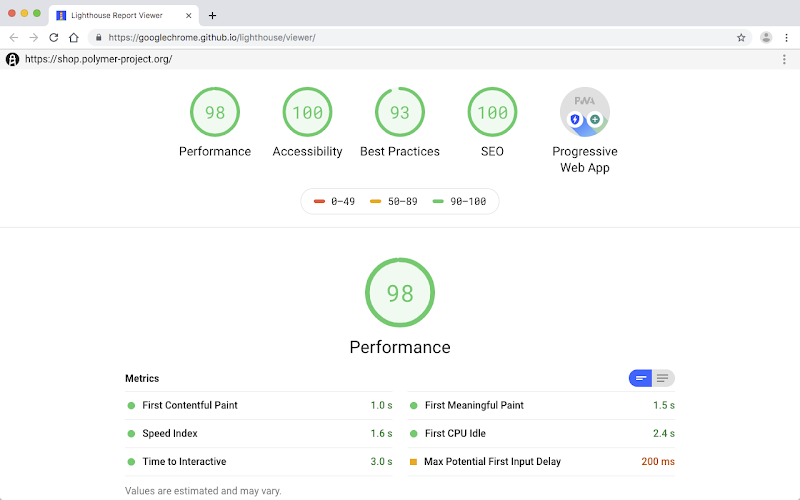
There also some performance considerations specific to nextjs. At the beginning, we talked about why we need to use SSR or SSG and avoid CSR. We discussed that pure CSR page leads to empty initial HTML that confuses the crawler bots.
Well, what should we do with the interactive stuff then? It is better to put the interactive sections of our code in a separate client component and then put that component in the server rendered page. That makes it an SSR or SSG page. The initial page load includes all the necessary content and client rendered stuff hydrate on client.
This solves the empty HTML content issues but client components themselves even in SSR or SSG pages are still not so great. Client components increase javascript bundle size and slow down page load. search engines don't like this. Although it's not that of a big deal and only an issue when js bundle is considerably large, it is better to reduce interactive stuff or isolate them as much as possible in smaller components. Yes, it is frustrating.
SSG is the most performant and SEO friendly option. SSR is on par but you must be careful if your data fetching in SSR is slow. That's the only impact.
2.2. Extended Metadata
Although name and description are the most important stuff, we can extend our metadata to include opengraph and twitter cards. These provide extra info as well as showing an image when sharing your website's link in social apps.
2.3. Excluding pages from indexing
Sometimes we want to exclude a page from search results. an admin dashboard, a login page, logout page, ... could be the pages we don't want to show up in google search.
To do this, we can exclude them directly in the metadata on that page with robots prop.
3. Content SEO
Content SEO focuses on creating pages that satisfy user search intent and are structured in a way that clearly communicates the topic to search engines. It basically means your technical endeavors do not matter if your content is shit.
You must provide valuable content that are relevant, well structured, and solves what users are searching for. There are some things to consider for better content:
- Having high quality, useful content (blog posts, guides, case studies)
- Keyword research and correct keyword placement
- Headlines and headings
- Image optimization (alt text, captions)
- Internal linking (link to other pages of your website)
4. Authority SEO
Authority SEO refers to building the trust, credibility, and reputation of a website by acquiring signals from outside the site to show search engines that your site is trustworthy, known, and recommended by others. this increases ranking power.
Things that positively affect your authority:
- Backlinks from other reputable websites (put your website's link in other pages or blogs)
- Social signals (guide people to your website from social media)
- Brand presence across the web
- User engagement (more clicks from google and actually staying on your site rather than closing it immediately)